How to: Identifying Identical HTC Phones

You might have the need to strongly identify or differentiate between two or more HTC android devices, especially whenever you need to flash a new ROM, Radio, bootloader amongst others.
It is important to identify the particular android device with which you are working on to avoid unnecessary damage to the phone. Here, we will discuss how to identify the particular android device you are working on.

In the case of identical HTC android devices, you are required to know the particular HTC model you are working on.
For example;
HTC Vivo and HTC Vivo_w are very identical HTC android devices with different ROMs amongst others.

Meanwhile, flashing a ROM that is meant for the HTC Vivo on the HTC Vivo_w could render the phone useless.

Three Ways to Identify Identical HTC Android Phones
1- Hboot Screen: if you are having difficulties at identifying a particular HTC phone, you could try check the HBoot screen. On the HBoot screen, you can see clearly, the precise version of the phone.
This is the best and the most accurate way to identify identical HTC phones.

2- The Battery Section: you can also check beneath the section of the phone. In some HTC phones under the battery, the phone model could be written as "PG320100" for the HTC Vivo_w and "PG320100" for the HTC Vivo.

3- Phone Settings: by going to the phone settings section. If the phone's ROM has never been tampered with, you can rely on the phone's name under the Menu <<>> Settings <<>> About <<>> Phone Identity

Please note that it is important for you to know the exact phone model before you begin any major software related works on any android device to avoid any unnecessary damage to the phone.


For any comments or questions over this article please, use the comment box bellow or contact us Via This Link. And if your questions is not about this article and needs our help over something related, Find Us on Facebook. Got any other info you want us discuss? Share it with us using the comment box or contact us!

Android Data Plans Finally Coming Out -Airtel Introduced it First

The much anticipated data bundle (Plans) for the android devices is finally coming out and is first introduced by Airtel Nigeria.
Based on the experience I have had with the Airtel Nigeria, the android data plan is friendly and price competitive.

Although, going by the available airtel BIS plans that work with the android devices, only few differences are noticed however; these few differences coupled with the strains you might go through trying to bypass the BIS plan for the android devices, it is conclusive that it is well worth it.

Airtel Android Data Bundle, USSD Code And Data Cap.


Below, you will find the newly introduced data plans for the android devices from Airtel Nigeria, their data caps and subscription codes.

Android Data Plans from Airtel
S/NData Plan/PriceData Cap.Sub. CodeValidity
1-N2,000 Plan2GB*141*200#30 Days
2-N3,500 Plan4.5GB*141*450#30 Days

***To check your Airtel Android data bundle, dial *223# and send.

This would not only display your android device data balance but also, your data bonuses and other bonuses as well.

For any comments or questions over this article please, use the comment box bellow or contact us Via This Link. And if your questions is not about this article and needs our help over something related, Find Us on Facebook. Got any other info you want us discuss? Share it with us using the comment box or contact us!
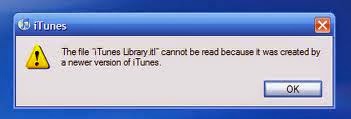
How to Fix "iTunes library.itl Error" On Fresh Installations

One of the most expected errors you might experience when you uninstall a newer version of iTunes and re-install an older version of iTunes on your PC is the "iTunes unable to load library.itl..." error message.
This "iTunes unable to load library.itl..." error prevents the newly installed iTunes from opening up or causes it to malfunction.

It is usually encountered when you uninstall a newer version of iTunes, living some file folders unremoved before you re-install an older version of iTunes on the same PC.

Within this article, we shall reveal the particular file folder which should be removed on your PC and as a result, correct the error without having to reinstall the iTunes setup again.

To Correct the "iTunes unable to load library.itl..." Error
1- Click "OK" when the error message pops up or simply close the error message.
2- Go to My Computer <<>> User <<>> My Music <<>> iTunes then, delete the iTunes folder.
3- Refresh your PC and lunch the iTuns program again by double-clicking the icon.

I hope this helps you solve the "iTunes unable to load library.itl..." error.


For any comments or questions over this article please, use the comment box bellow or contact us Via This Link. And if your questions is not about this article and needs our help over something related, Find Us on Facebook. Got any other info you want us discuss? Share it with us using the comment box or contact us!

Etisalat BIS, BES For Blackberry 10 Series Cheat: No More Working

Recently on Aryk Enterprise blog, we shared a hint on how to use the Blackberry BIS, BES on Blackberry 10 Series including the configuration settings that would enable you browse like the normal Blackberry device using any Nigeria network.
Regrettably, we recently noticed that the configuration settings no longer work for Etisalat users using the settings we have provided.

Although, the same configuration settings were given if you are to using your data (MB), either bonus or subscribed on the Blackberry 10 series, it is confirmed still working for the device.

This is a work still in progress, we shall update you as soon as the cheat kicks back in i.e when the settings became stable and works steadily, we shall update you.

Meanwhile, you might consider using other networks BIS, BES subscription including MTN, Airtel and Glo on your Blackberry 10 series for the time being or at least, until the Etisalat cheat is restored.

If you have missed the tutorial on how to use your Blackberry BIS, BES on your Blackberry 10 series, click here for the settings to be used on other networks.


For any comments or questions over this article please, use the comment box bellow or contact us Via This Link. And if your questions is not about this article and needs our help over something related, Find Us on Facebook. Got any other info you want us discuss? Share it with us using the comment box or contact us!

10 Nokia Phone Problems that Demand Flashing

Just for knowing sake or any other reasons, we have compiled ten (10) problems or issues that might be facing your Nokia phone and of which, flashing the phone might be the last resort to resolve the problem.
In case you don't know, flashing involves clearing your Nokia phone's system files and in so doing, replacing the phone's system files with entirely new one.

Depending on the type of Nokia phone, the new flash files to be used could be upgraded or downgraded version, it is always STRONGLY ADVISED to use an upgraded version of flash files.

10 Nokia Phone Problems Correctable By Flashing


All the issues listed below are common issues with most Nokia phones and are often correctable by flashing the phone.

1- Off And On: when you noticed that a Nokia phone suddenly begins coming on and off, this kind of problem is caused by some uncompleted sequence(s) of the phone's system files and had corrupted the phone's system files.
Your solution -flashing the phone

2- White Screen: this is another common problem that affects Nokia phones. This kind of problem can be caused by three (3) things: i- the phone screen ii- the phone flex (if at all) iii- corrupted system files.
If it isn't flex that connects the phone's screen/front panel to the board, then white screen problem is caused by either the phone's damaged screen or corrupted system files. Visit this page to learn how to be certain if the problem was caused by the phone's screen or corrupted system files.
Your solution -flash the phone or change the screen

3- Slow Behaviour: it could be so irritating to using a phone that slows down too much. This kind of problem is usually caused by consumed application memory of the phone. And to free just enough memory space for the phone to regain its speed, you just have to flash the phone.

4- Security Code Request: if you have protected your Nokia phone with a security code or password, and for one reason or another; you forgot the password or security code, your ONLY option might be to flash the phone.

5- Call Button Inactivity: at some point, a Nokia phone's call button might become so inactive that it switches off the phone whenever the button is pressed, the ONLY option you have here is to flash the phone because you need to reconfigure the phone and restore it to factory defaults.

6- Call Logs/Register Failure: this is a similar problem to the call button problem. Sometimes, loading call logs/register hangs up some Nokia phones or switches the phone off. To resolve this problem, you could free the phone's inbuilt memory or flash the phone.

7- Application Certificate Error: if you notice that whenever you try to install certain applications on your phone, the phone says " Certificate not on SIM or Phone", the solution here is always to perform a FULL FLASHING on the phone using upgraded flash files.

8- Application Corruption: often times, when your Nokia phone is affected by virus, it begins to corrupt installed applications on the phone and makes the phone malfunction.
Your solution -flash the phone.

9- Driver Installation Error: you might want to connect your Nokia phone to a PC and found out that the PC does not recognise your phone as a result of incomplete driver installations on the PC. This is also mostly caused by corrupt system files of the phone.
Your solution -flashing the phone.

10- Short Power/Viberation at Startup: if a Nokia phone only vibrates whenever you try to put on the phone, it is most likely that the phone had been flashed using an outdated flash files or flash files older than the one that was on the phone.
To correct this error and bring the phone back to live, you only have to flash the phone again using the latest flash files for that phone.


For any comments or questions over this article please, use the comment box bellow or contact us Via This Link. And if your questions is not about this article and needs our help over something related, Find Us on Facebook. Got any other info you want us discuss? Share it with us using the comment box or contact us!

How to Get 100 Free SMS from Glo to Any Network Daily

If you are the type that uses SMS much more than calling or that you simply need SMS to complete certain tasks, here is how to get free unlimited SMS from Glo daily.
If you already have Glo line all you have to do is to follow the guides given below to begin enjoying your unlimited SMSs from Glo.

Guides to Get Unlimited FREE SMS from Glo

By following these guide lines, you could enjoy unlimited free SMS from Glo for as long as you wish and these free SMSs could be used and sent to any network.
1- Get a Glo Line: if you already have a Glo line, make sure that you are on Glo Bounce plan. If you do not have Glo line and wish to enjoy this free SMS offer, simply get a Glo line.

2- Migrate to Glo Bounce Plan: the Glo Bounce plan is a tariff plan introduced by Glo sometimes last year. The tariff plan gives you free data (MB) for browsing and a free SMS for every billed SMS sent. I.E, if you send an SMS to a line and you are charged certain amount for it, Glo Bounce gives you one free SMS in return.
To migrate to the Glo Bounce Plan, dial *170*4#. Please note that you might be charged N100 for the migration if it wasn't your first tariff plan migration within 30 days.

3- Now, to Enjoy Free SMS: to enjoy free SMS from Glo even if you don't have N1 on your Glo line, simply text INFO to 127 (It's FREE of Charge). Once the message delievers, you will receive one SMS in return and the SMS could be sent to any network.
You can send "info" to "127" for any number of times daily, and each time you send "info" you are given one free SMS in return.

Remember to use this cheat/method when you are short of airtime/call credit and wish to communicate with someone especially; at emmergency situations.


For any comments or questions over this article please, use the comment box bellow or contact us Via This Link. And if your questions is not about this article and needs our help over something related, Find Us on Facebook. Got any other info you want us discuss? Share it with us using the comment box or contact us!

HTC Vivo_w ICS ROM: HTC Incredible 2 ROMs

If you ever feel like to choose from a wide selection of ROMs for your HTC Vivo_w also known as HTC Incredible 2, here is a list of ICS ROMs you can choose from.
Often times, its hard for you to differentiate between HTC Incredible 2 and Incredible S by mere looking and as a result of this, most people flash Incredible S ROMs on HTC Vivo_w, which is also HTC Incredible 2

As a matter of fact, HTC Incredible S ROM is much more available for download on the internet as maybe compared to the HTC Vivo_w ROM. This is because more developers find interest in developing ROMs for the HTC Incredibles however, there are still some available ROMs for the HTC Vivo_w as well.

For a list of very good and suitable ROM for your HTC Incredible 2 also knows as HTC Vivo_w, you may check the page below:
HTC Incredible 2, HTC Vivo_w ROM Download

The page contains both ICS, Jellybean and Gingerbread ROMs for the HTC Incredible 2, HTC Vivo_w and most of which are custom ROMs. Also, you may download fully stock ROMs for the HTC Incredible 2 also known as HTC Vivo_w.

Click here for info on how to flash custom ROM on your android phone or here on how to flash custom recovery on your HTC Incredible 2.


For any comments or questions over this article please, use the comment box bellow or contact us Via This Link. And if your questions is not about this article and needs our help over something related, Find Us on Facebook. Got any other info you want us discuss? Share it with us using the comment box or contact us!