Tutorial - Faça Root e Unroot com apenas um click

A grande questão de todo usuário android é sobre o requesito root. Embora tenha muitos usuários que tem medo outros já perderam e alguns já manjam nos Paranauê, este aplicativo promete fazer isso de forma rápida e simples

O aplicativo citado logo acima já é um pouco antigo ‘Framaroot’ já vem desde os tempos antigo onde era um sonho fazer esse método pelo aparelho sem precisar de PC, drivers, programas e etc. ele fez o que promete rápidamente em um click logo após a instalação.


Framaroot versão 1.9.1


Descrição sobre o aplicativo (Não disponível na playStore)

O Framaroot é uma alternativa interessante para quem procura algo simples para realizar o root em seu dispositivo Android. A compatibilidade com diversos dispositivos é grande, por isso merece ser testado.

Nos primeiros dias do Android, não era recomendado fazer o Root nele. Embora esse sistema operacional tenha se tornado cada vez mais seguro a cada atualização, os fabricantes de dispositivos, bem como operadoras de telefonia móvel continuaram a adicionar proteções mais fortes contra ataques de hackers, tornando o processo de root mais difícil.

Atualmente, é extremamente difícil encontrar um aplicativo que realize o processo de Root com apenas um clique, por isso os usuários têm que recorrer a métodos específicos para rootear o seu smartphone ou tablet. Agora, isso mudará, pois o Framaroot é um aplicativo muito útil, já que “rooteia” o Android com apenas um clique. É compatível com uma infinidade de dispositivos, tanto os populares como os mais obscuros.
O mais interessante é que você não precisa conectar o dispositivo ao computador, executar qualquer comando ou enviar arquivos para ele a partir do Windows.


Tutorial Explicativo:


(Obs: Não esqueça de ativar o modo ‘depuração usb’)


2- Inicie o aplicativo

3- Selecione Install Superuser SU

4- Aplique e reinicie o aparelho


Caso de certo mostrar esta mensagem:


Para fazer o processo de Unroot é a mesma coisa

Selecione Unroot e aplique e reinicie!


Meu aparelho é compatível?


O aplicativo não funciona em 100% dos aparelhos então fiz uma lista dos aparelhos que realmente funciona (até onde o desenvolvedor fala) a lista era muito grande para postar aqui.

Lista para verificar os modelos que funcionam Download Aqui


QRCode

Tutorial - Localize seu aparelho sem nenhum aplicativo instalado

Perdeu seu smartphone ou foi roubado? localize ele mesmo que você não tenha baixado nenhum app de rastreio com este serviço da google que todo aparelho android tem com ele você pode localizar seu aparelho, caso você perdeu seu celular tambem tem a opção de Tocar mesmo que ele tiver no silencioso e tambem bloqueie com uma senha tudo isso pelo seu computador.
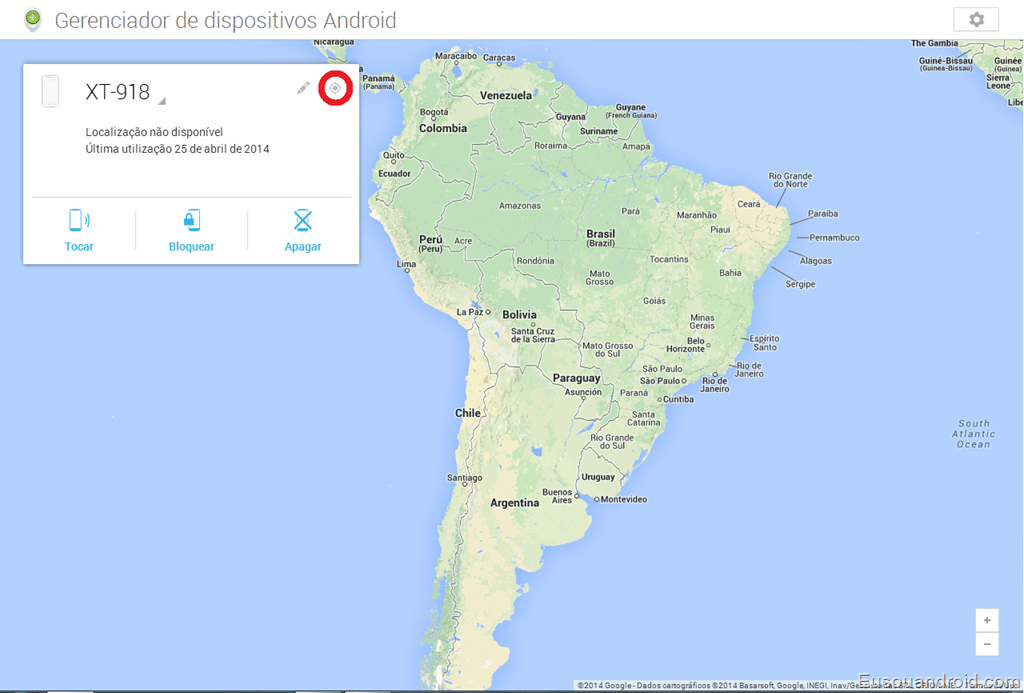
Vamos lá Primeiramente entre no site “Gerenciador de dispositivos Android” faça login com sua conta google e vai ter essas opçoes Tocar, Bloquear e Apagar.

image
Para localizar seu dispositivo android clique no icone que esta contornado na imagem ele irá entrar em contato com o aparelho e irá mostrar a localização exata no mapa para isso o seu gps deverá estar ligado
image
Clicando em Tocar ele vai tocar seu aparelho durante 5 minutos mesmo se o aparelho estiver no silencioso clique em Chamar para confirmar.
image
Clicando na opção Bloquear ele vai bloquear seu aparelho com uma senha na tela inicial para configurar essa senha digite ela e confirme depois clique em Bloquear.
image
Clicando em apagar ele irá restaurar seu aparelho deixar zerado como veio de fábrica.
image
Um método de rastrear seu aparelho muito simples e eficás, e ainda melhor você não precisa baixar nada é apenas um serviço da google que todos aparelhos android tem.

Tutorial - Removendo anúncios e propagandas do aplicativo do youtube


O youtube é um dos aplicativos mas baixados da play store e também o mais visualizado são milhões e milhões de vídeos assistidos todos os dias. Todos reclamam dos anuncios que os vídeos geram através do aplicativo. esperar 5 segundos para fechar uma propaganda nunca mais.

Muitos vão amar outros iram odiar. um tutorial simples e rápido que só vai ultilizar alguns segundos do seu tempo. remova aqueles anúncios chatos que você tem que esperar 5 segundos para pode assistir a um vídeo, vá direto ao ponto.


Embora este assunto não se fale muito por ai para o requesito android. todos já sabem que existem outras maneiras de bloquear os anúncios nos navegadores do PC adeus Ads maldito.


Requesitos:


1- Aparelho com sistema android 4.0 ou superior (vou pesquisar para aparelhos 2.3)

2- Ter ROOT

3- Instalador do Xposed (O aplicativo esta todo em português)

4- Aplicativo Oficial do Youtube (Recomendo a versão mas atual)


Tutorial: (Click na imagem para ampliar)


1- Instalar o aplicativo Xposed

2- Abra-o. selecione ‘Framework’

3- Agora selecione ‘Instalar/Atualizar’ pressione ‘Ok’

4- Agora reinciar o aparelho

5- Quando o aparelho ligar abra o aplicativo Xposed novamente

6- Vá em ‘Baixar’ agora na caixa de pesquisa digite (YouTube) considere letras maiúsculos e minúsculas para encontrar o módulo. Irar aparecer este módulo ‘YouTube Adaway’ selecione-o

7- Selecione e click em baixar. Ele vai e iniciar o download e instalar automaticamente

8- Volte a página incial do Xposed vá em ‘Módulos’ e marque o ‘YouTube Adaway’

9- Reinicie o aparelho novamente

10- Assista qualquer vídeo do yutube sem mas nenhum anúncio


Obs: serve apenas para o aplicativo do youtube este tutorial.


Testado


Samsung S4 Android 4.3
Nexus 5 Android 4.4
Motorola G Android 4.3
Tablet Genesis GT 7305 Android 4.2


O aplicativo Xposed não afetarar seu aparelho muito menos o YouTube Adaway ambos necessitam de ROOT. e um necessita do outro para funcionar.


Tutorial em vídeo de como instalar o Xposed Framework


DOWNLOAD XPOSED

QRCode


DOWNLOAD YOTUBE ADAWAY <—— Caso não encontre o módulo pelo xposed

QRCode


DOWNLOAD APLICATIVO YOUTUBE

QRCode

Nokia Best, BB5 Easy Service Tools Now Included: ABC Package

Nokia Best BB5 Tool
Nokia Best, BB5 Easy Service Tool Now Included in the ABC Package If you have purchased the A B C to Mobile Phone Software Engineering package, you must have learnt how to use Phoenix Service Software to flashing, upgrading and unlocking Nokia phones.

But as requested by some, we have now included the Nokia Best, BB5 Easy Service tool in the package.

Nokia Best, BB5 Easy Service Tool is also one of the easiest tools for flashing, unlocking, upgrading Nokia phones including the Nokia Windows phones.

This particular program was to be included in the package at the initial stage, but it was under test and has now been perfected for use by even, a novice.

Uses of this Program


Besides the primary purpose for including this particular program in the package, there are still some potential benefits of the Nokia Best, BB5 Easy Service Tool.

1- Nokia Phone's Flashing, which is the main purpose.
2- Unlocking/Removing of Security Codes on some Nokia phones.
3- Network/SIMLock remover functionalities.
4- Nokia Windows Phones direct flashing.
5- Read Storage/Media Card Password.
Please refer to the box below for info on how to get your own copy of this program, Nokia Best, BB5 Easy Service Tools free of charge from Aryk Enterprise.

This update is intended for those who have purchased the A B C to Mobile Phone Software Engineering eBOOK and the package as a whole. The package contains the teachings and all the tools you need to become a mobile phone software engineer. For the detailed info, visit the package page here or contact us via 0807 788 8311, 0805 593 0701 or aryk.info@gmail.com.
Thanks.


For any comments or questions over this article please, use the comment box bellow or contact us Via This Link. And if your questions is not about this article and needs our help over something related, Find Us on Facebook. Got any other info you want us discuss? Share it with us using the comment box or contact us!

HTC Amaze 4G Stock Recovery.img: Download Links

If you ever have a use for HTC Amaze stock recovery, here is one for you to download. This particular recovery.img is for T-Mobile HTC Amaze 4G.

The recovery.img is contained in a zip file which is flashable via hboot and of course, you may unzip the file to extract the recovery.img and flash it directly from the command prompt or for whichever use you may need it.

Why Flash Stock Recovery?


In spite of the fact that most android users yearn to have custom recovery flashed on their phones, there are still some reserved reasons why you might still need to have stock recovery back on your phone and the number one (1) reason is the OTA Update purpose.

Virtually all the available custom recoveries as at now do not support the OTA update and that's one reason why you might need the stock recovery.

For info on how to flash the recovery.img zip on your HTC Amaze 4G, visit this page on our blog and follow the guidelines on how to flash Eng-hboot via the hboot using an SD Card.


HTC Amaze Stock Recovery.img
Drop box Link PH85IMG.zip
Mediafire LinkPH85IMG.zip
Video EditorConvert Any Video Files


Disclaimer
Flashing on this file is at your own risk meanwhile, Aryk Enterprise has done its best to verify that the file is not corrupted and accurate for the T-Mobile HTC Amaze 4G. For further assistance, use the Contact Us widget at the sidebar to mail us.


For any comments or questions over this article please, use the comment box bellow or contact us Via This Link. And if your questions is not about this article and needs our help over something related, Find Us on Facebook. Got any other info you want us discuss? Share it with us using the comment box or contact us!

How to Download Nokia RM, Flash Files or Firmwares: A B C Updates

Within this page, we discuss the latest Navifirm windows program for downloading Nokia phones' firmwares and how it is being used. Also, the download link for the latest Navifirm program is included.

You are advised to download the lhuatest Navifirm program as the older versions may go in extinction (no longer function) any time soon.


As discussed in the A B C to Mobile Phone Software Engineering eBOOK, published by Aryk Enterprise, NaviFirm is one of the best windows programs you can use to download all Nokia phones' firmware including the latest Nokia phones.
All you have to do is look for the phone's product code or RM Number and all the firmwares available for that particuar Nokia phone is at your fingertips.

With either the Nokia phone's product code or the RM number, you can search for the appropriate firmware for that particular phone within Navirfirm.

How to Download Nokia Firmwares Using Navirfirm


1- Get the latest Navifirm 3.2 from the Aryk Enterprise free of charge using the contact Widget by the Sidebar.
Please note that Navifirm would not run unless you have Netframework 4.0 or higher installed on your system.

2- Unzip the downloaded file somewhere on your PC. The file automatically creates a folder named "navifirmplus_3.2" for itself.

3- Locate the folder where the Navifirmplus is saved. Open the folder and double click "navifirmplus" file.

4- On the prompt that appears next, click "Run" to start the Navifirm program.

5- Now, Navifirm should open up. Please, take a closer look at the image below for a better understanding on how to search for the particular Nokia phone's firmware you are looking for.
Better still, check other illustrations on Nokia flash files here on this page.

Navirfirm 1
Right-click to view image
Navirfirm 2
Right-click to view image


This update is intended for those who have purchased the A B C to Mobile Phone Software Engineering eBOOK and the package as a whole. The package contains the teachings and all the tools you need to become a mobile phone software engineer. For the detailed info and how to get the package, visit the package page here or contact us via 0807 788 8311, 0805 593 0701 or aryk.info@gmail.com.
Thanks.


For any comments or questions over this article please, use the comment box bellow or contact us Via This Link. And if your questions is not about this article and needs our help over something related, Find Us on Facebook. Got any other info you want us discuss? Share it with us using the comment box or contact us!

HTC Vivid Recovery And Eng-hboot Flashable Via hboot

HTC Vivid- click to view image

Browsing through the internet, I have seen various methods some have used to unlock the HTC Vivid bootloader then, flash a custom recovery. So, l decided to make the whole work simple and for this, I came up with a simple solution.
I made a zip file named PH39IMG.zip which is flashable via hboot. This file contains an ICS bootloader and CWM recovery for the HTC vivid.


The bootloader is not an ENG-off hboot but it is more or less of it. The boot loader is J-bear bootloader and any .img files like recovery.img, radio.img and others could be flashed on it.

What is Eng-off hboot


Hboot is the term HTC uses to refer to their android boot loaders which loads and boots either android or recovery. Meanwhile, an ENG-off boot loader gives you the opportunity to modify or flash certain partitions or .img file on the android device like the radio, recovery or even the boot loader itself which ordinarily, you would need root permission to perform some of these tasks within the android.

Also, with an ENG-off hboot, you have the opportunity to load both signed and unsigned versions of ROM on the phone; especially useful for breaked android devices.

What Is ClockWorkMod Recovery?


ClockWorkMod recovery is one of the most known custom recoveries available for android devices. It can be used to perform most activities of other custom recoveries.

Detailed info about Custom Recovery and Stock Recovery here.

How to Flash the PH39IMG.ZIP File via hboot


Please, note that this process may render your phone useless if carelessly used and that, interruption of the process for any reason or by any means is destructive therefore; you should exercise caution carrying out the process.
This process updates your HTC Vivid, holiday with the latest clockworkmod recovery and ICS hboot.

For optimal result, your battery should be at least, 30% charged before you proceed.

1- Download the file named PH39IMG.zip in the table below this page.

2- Copy the file to the root of your SD Card i.e don't copy it under any folder in the SD Card. And make sure it is named PH39IMG.zip

3- Disable fastboot mode on the phone by going to Menu <<>> Settings <<>> Power <<>> Fastboot.

4- Put off your phone or remove the battery and re-insert the battery again.

5- Boot the phone to hboot by pressing the Power + the Volume Down buttons together for some seconds until the phone boots to hboot.

6- Wait few seconds for the phone to detect and scan the PH39IMG.zip file on your SD Card. If the phone prompts that; "Do you want to start the update?" press the volume Up button to start the update

7- Wait few seconds for the update to complete and reboot your HTC Vivid, holiday.


Congratulations! Now, you can install any custom ROM, upgrade or downgrade your HTC Vivid, holiday and do lots more!

PH39IMG.zip File Download Links
Drop box Link PH39IMG.zip
Mediafire LinkPH39IMG.zip
Video EditorConvert Any Video Files


In case the PH39IMG.zip file does not work for your HTC Vivid, kindly use the Contact Us gadget up by the sidebar to send me your HTC Vivid CIDnum and I shall send you the specific file for your HTC Vivid.


For any comments or questions over this article please, use the comment box bellow or contact us Via This Link. And if your questions is not about this article and needs our help over something related, Find Us on Facebook. Got any other info you want us discuss? Share it with us using the comment box or contact us!